


No products added!
For anyone who has ever spent an evening hunting for a CH340 driver instead of actually building a robot.
Ask anyone who has bought their first programmable robot what stopped them cold, and it is rarely the code. It is the twenty minutes before the code. Install the flashing tool. Find the USB-to-serial driver for your exact chip. Configure the environment. Locate the right firmware in a folder full of .bin files. Set the flash address, the partition table, the baud rate. Then discover the board still is not showing up, because the driver silently failed on Windows 11.
Hiwonder — the Shenzhen robotics company behind MechDog, PuppyPi and JetHexa — counted that cost and decided it was the wrong place for beginners to spend their time. Their own comparison puts the traditional route at 30 to 40 minutes end to end, plus 3 to 5 minutes per compile. Their answer, WonderFlash, is a firmware flasher that lives entirely in a browser tab and does the whole thing in three steps.
The Wall at the Front Door
This is not a niche complaint. It is the single most common reason a beginner’s first robot kit ends up in a cupboard. The hardware arrives working, the tutorials are good, and then the first hour disappears into a device-manager rabbit hole that has nothing to do with robotics.
Hiwonder has been shipping education robots since 2015 — across ESP32, STM32 and Arduino control boards, and into thousands of schools — so they had unusually good visibility into exactly where students stall. The answer was not better documentation. It was removing the step.
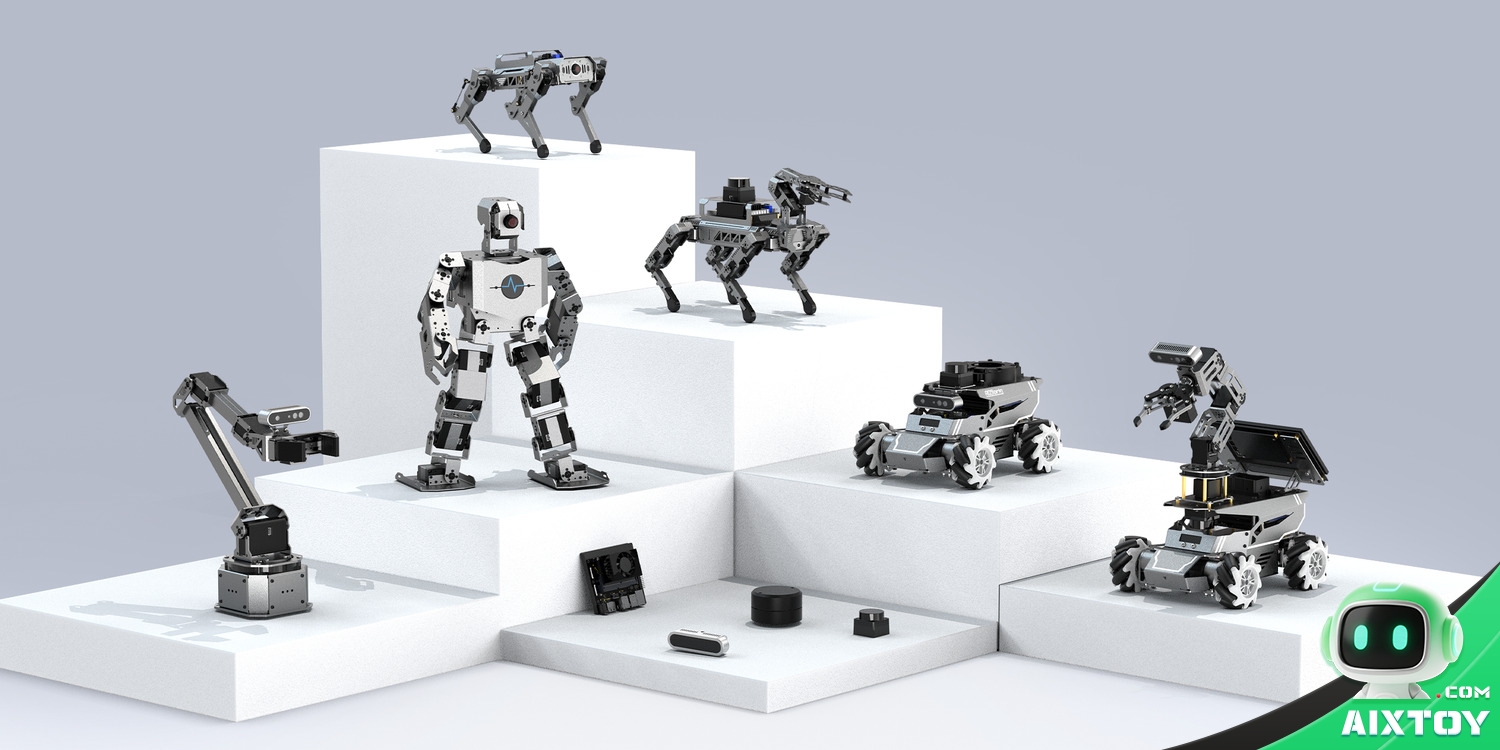
What WonderFlash Actually Is
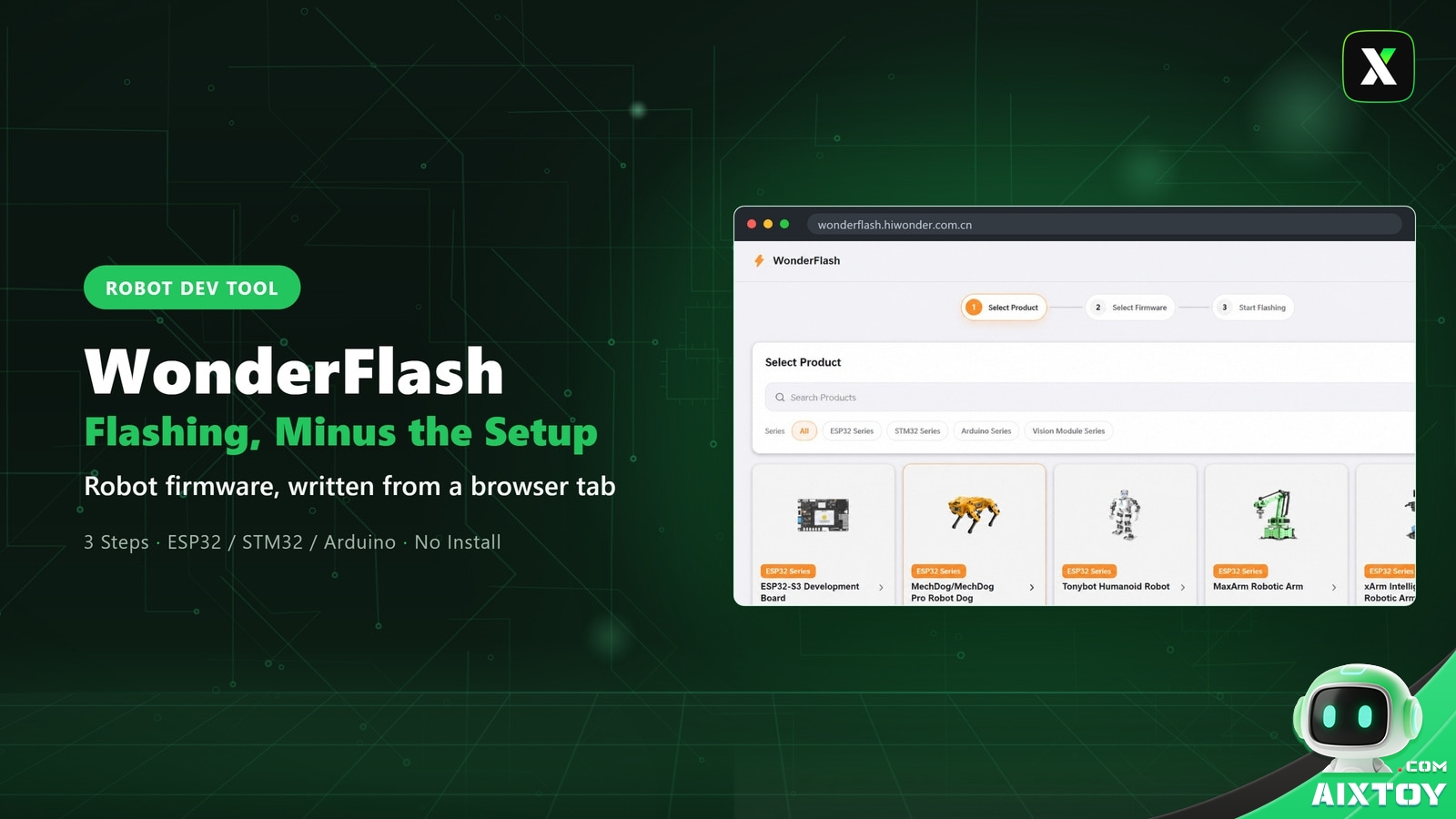
WonderFlash is a web application at wonderflash.hiwonder.com.cn. There is no client to download, no toolchain to install, no SDK to configure. You open the page, plug the robot in with a USB cable, and work through three screens:
- Select product — a visual catalogue of Hiwonder’s ESP32, STM32 and Arduino-based robots, modules and accessories, each shown with its product photo and firmware count.
- Select firmware — the firmware library for that exact model, pre-compiled and ready to pick.
- One-click flash — the browser talks to the board directly and writes the firmware.
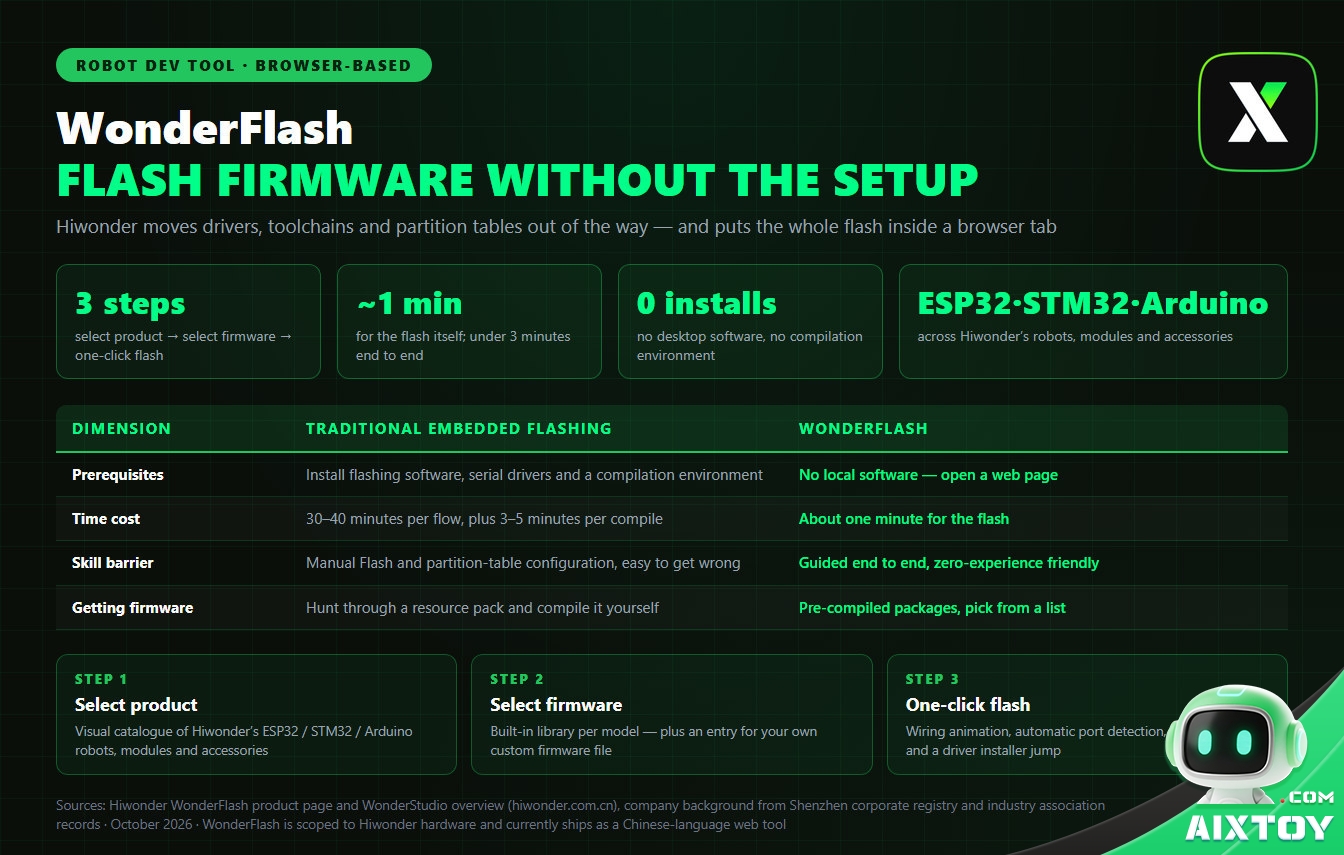
That is the whole workflow. Hiwonder’s headline claim is under three minutes for the full process, with the flash itself measured at about one minute.
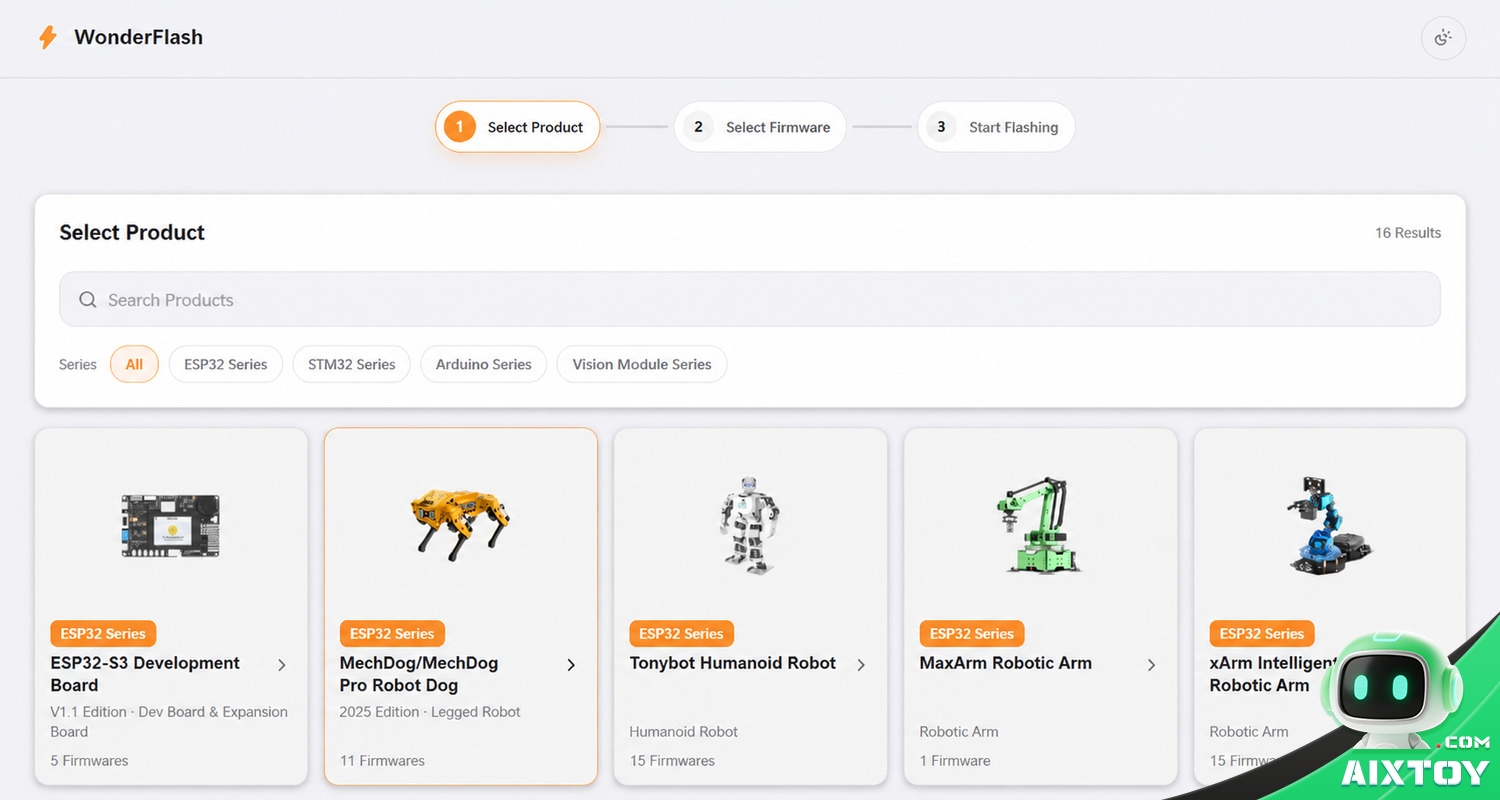
Step 1 — Select Product
The product screen is a grid of cards rather than a dropdown of part numbers. Each card carries the product image, its series, its edition, and how many firmware packages are available for it — for example Robot Dog · 2025 Edition, a humanoid robot, a robotic arm, or a vision module series with seven packages.
There is a search box and series filters (All, ESP32, STM32, Arduino, Vision Module), which matters once a catalogue runs past the dozen models most people can hold in their head. The small detail that stands out: the product photo is the selector. Beginners identify a robot dog by sight long before they identify it by its control-board revision.
Step 2 — Select Firmware
Choosing the model opens its firmware library, organised in two levels. First the flash target — a MechDog, for instance, splits into Main Firmware and Vision Module, because the robot dog carries more than one programmable chip.
Then the behaviour. For MechDog the available packages include factory firmware, ultrasonic distance alarm, self-balancing, colour recognition, visual line tracking, face recognition and colour tracking — each with a one-line description of what it does, so you can choose “I want the dog to follow a line” instead of guessing from a filename.
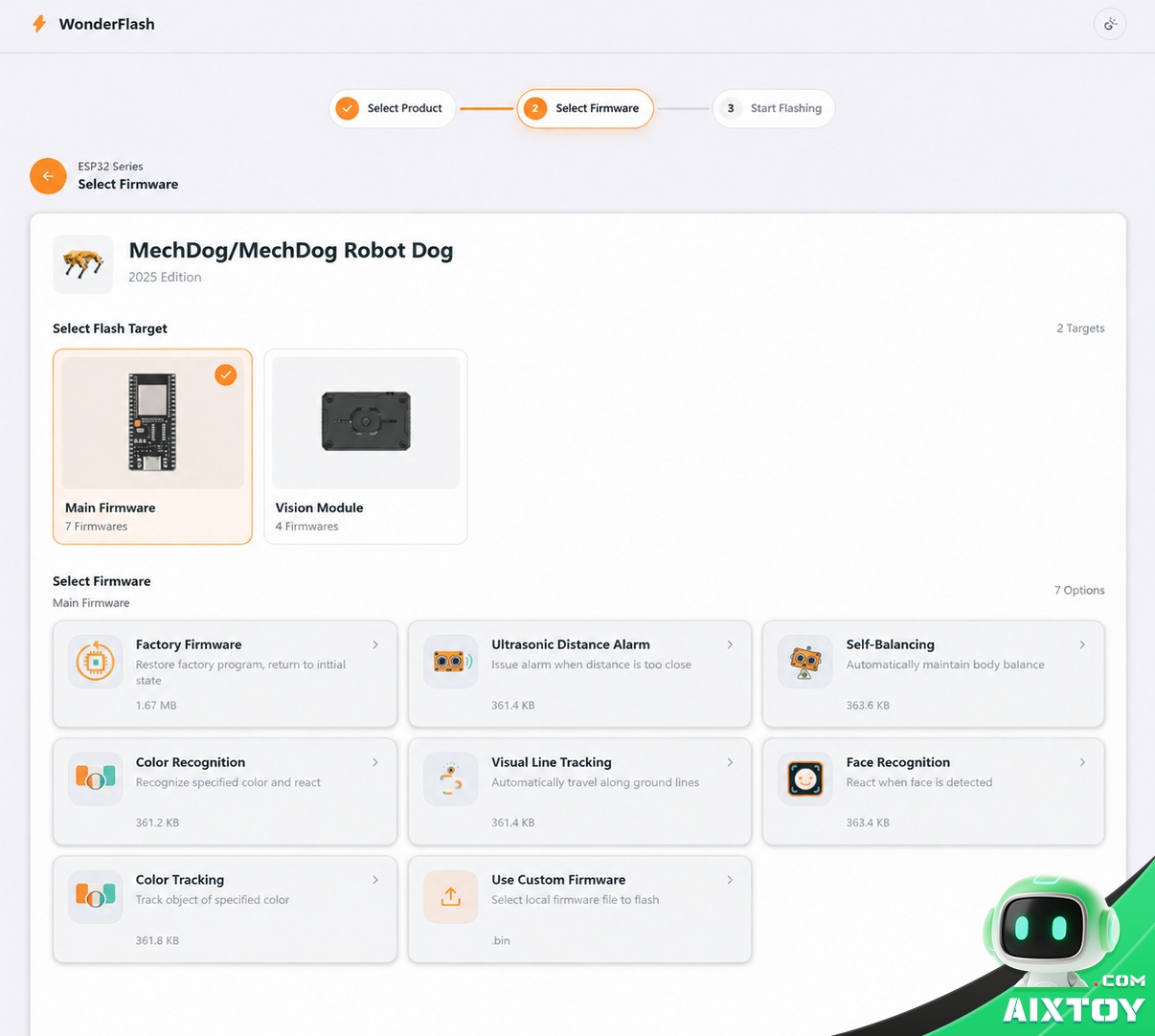
There is also a Use Custom Firmware entry that accepts your own file. That is the part that keeps WonderFlash relevant past week one: once you outgrow the demos, the same tool still flashes whatever you compiled yourself.
Step 3 — One-Click Flash
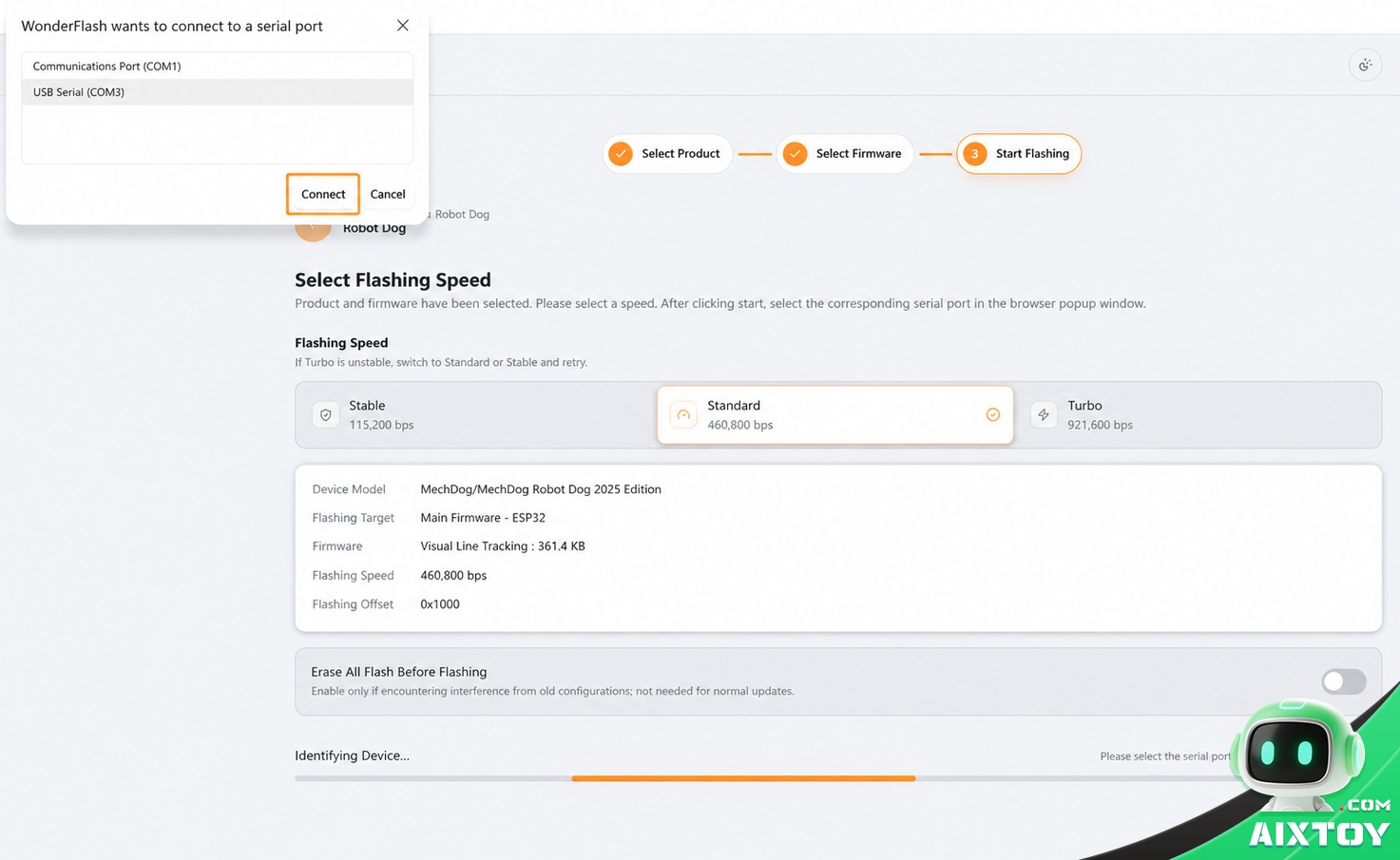
The flashing screen is where the beginner-proofing shows. Depending on the chip, WonderFlash offers three speed modes: Stable, Standard and Turbo — in the MechDog’s case 115,200, 460,800 and 921,600 bps. Hiwonder’s own on-screen guidance is refreshingly honest: if Turbo is unstable, switch to Standard or Stable and retry. That is exactly the kind of advice that usually lives in a forum thread rather than the product UI.
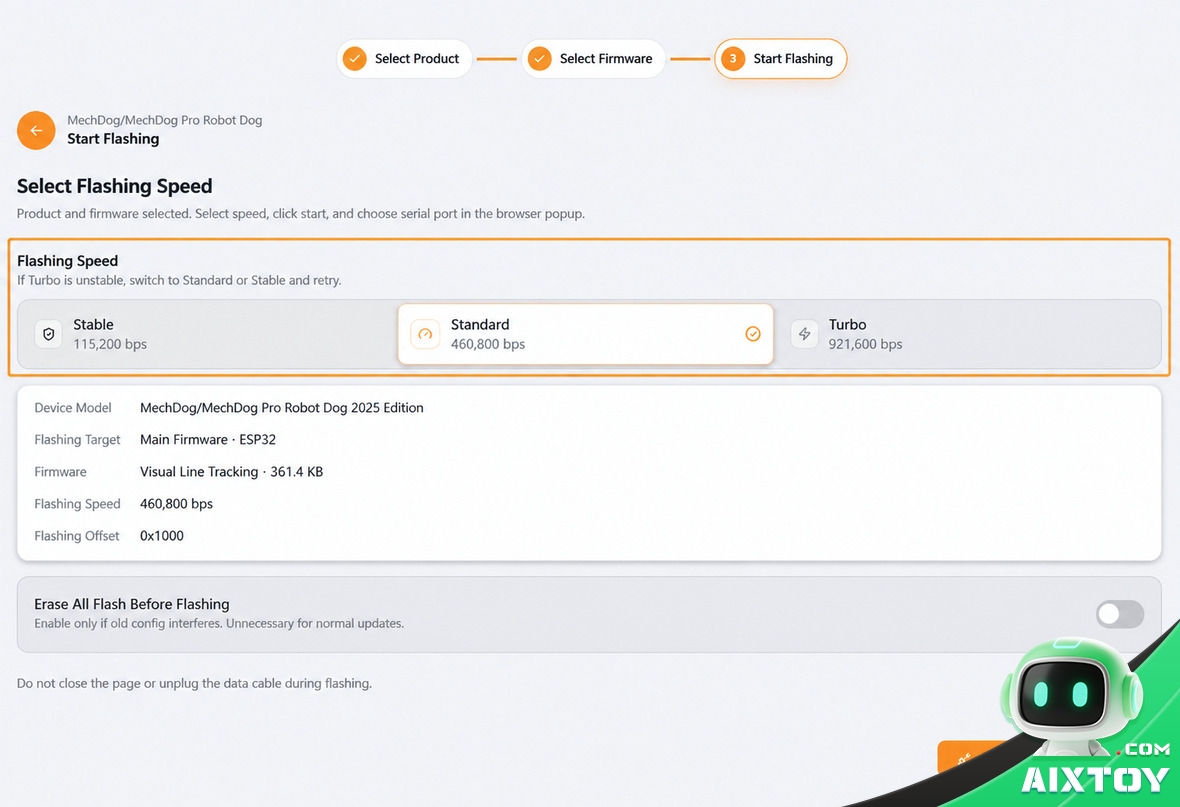
Before the flash starts, a short wiring animation shows where the cable goes — rather than a diagram buried in a PDF — and the system then lists the serial ports it can see. You pick the right one from a browser popup and the flash begins, with progress drawn live on the page.
When the Board Doesn’t Show Up
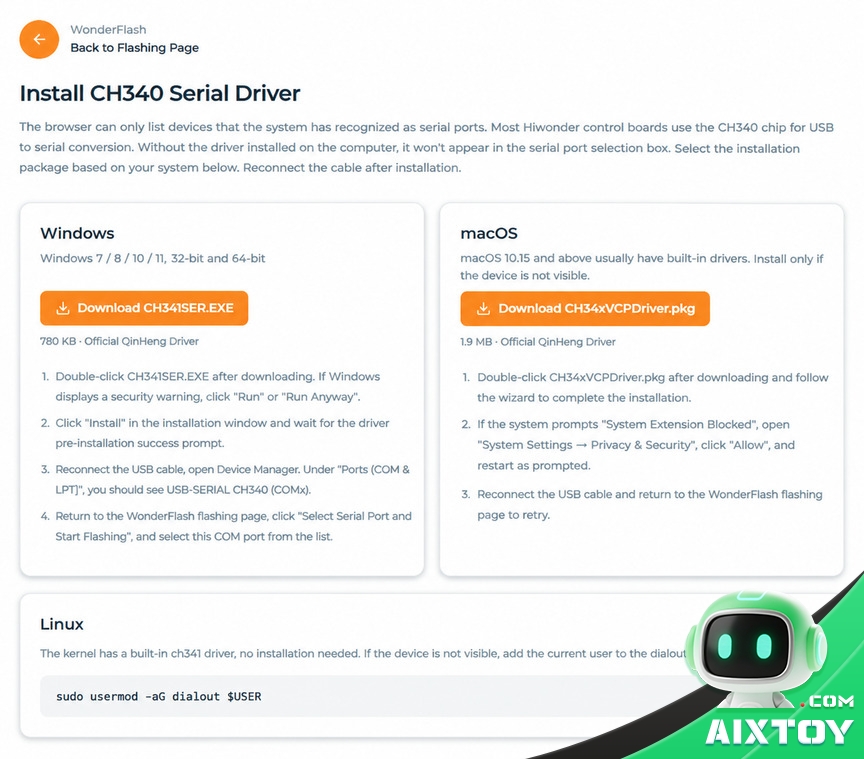
This is the failure that ends most beginner attempts, so it is worth noting that WonderFlash handles it head-on. If the board is invisible because the computer has no USB-to-serial driver, the page detects that and offers a jump straight to the correct installer.
Hiwonder’s control boards mostly use the CH340 chip, so the guide covers all three desktop platforms: Windows (CH341SER.EXE, including the “Run Anyway” and blocked-system-extension branches), macOS 10.15+ (which usually ships the driver) and Linux (built-in ch341, with a note about adding your user to the dialout group).
One Toggle Worth Knowing
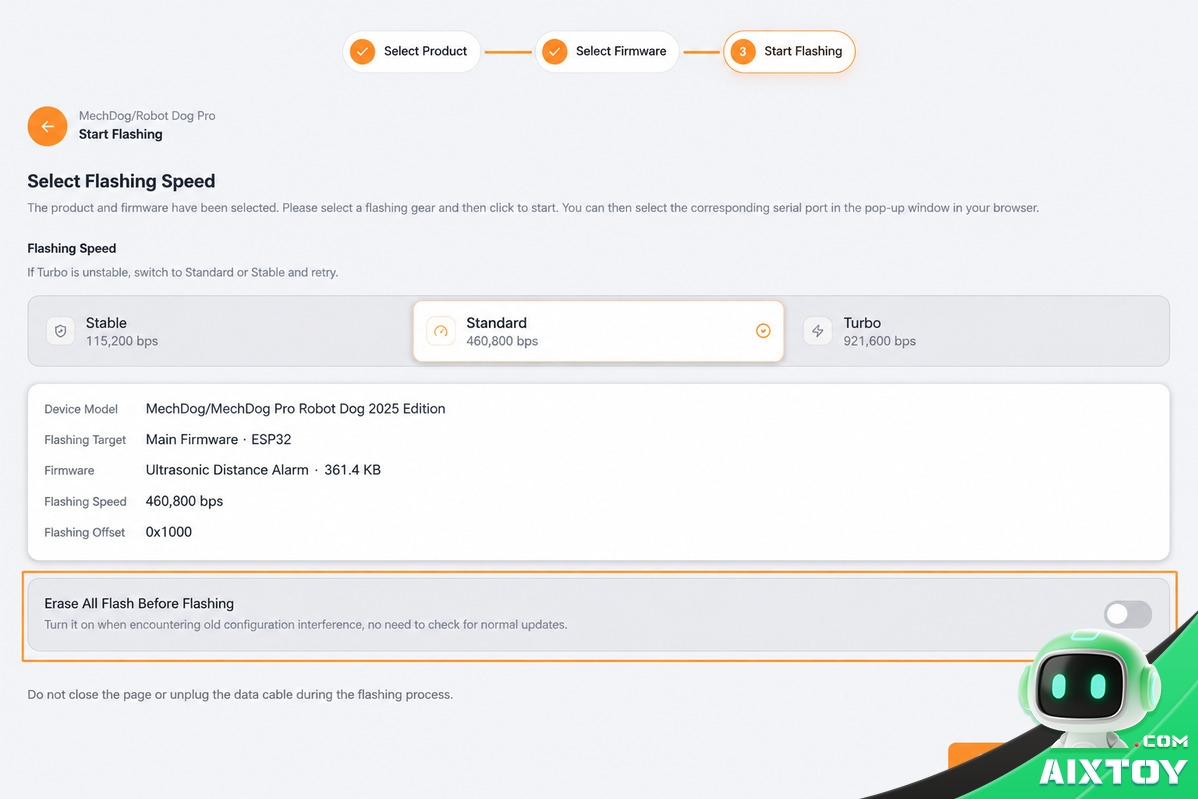
An “Erase All Flash before flashing” checkbox clears leftover settings when an old configuration is interfering with a new firmware — off by default, because a normal update does not need it. The screen also carries the one warning every embedded developer has learned the hard way: do not close the page or unplug the cable during flashing.
Traditional Flashing vs WonderFlash
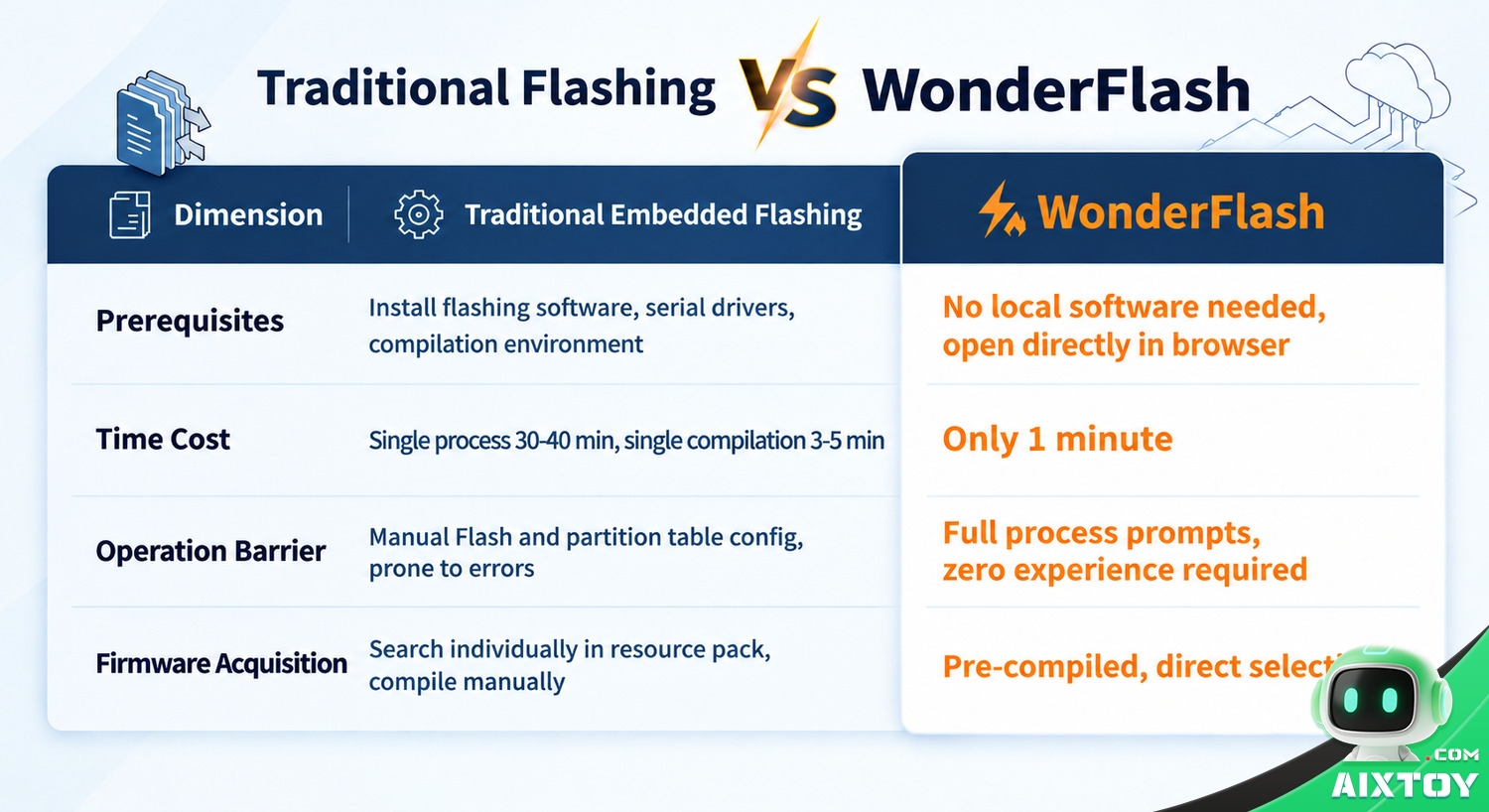
Laid out side by side, the difference is not a marginal speed-up — it is a change in who can complete the task.
| Dimension | Traditional Embedded Flashing | WonderFlash |
|---|---|---|
| Prerequisites | Install flashing software, serial drivers and a compilation environment | No local software — open a web page |
| Time cost | 30–40 minutes per flow, plus 3–5 minutes per compile | About one minute for the flash |
| Skill barrier | Manual Flash and partition-table configuration, easy to get wrong | Guided end to end, zero-experience friendly |
| Getting firmware | Hunt through a resource pack and compile it yourself | Pre-compiled packages, pick from a list |
The Bigger Picture: WonderStudio
WonderFlash is the first shipped piece of a wider initiative called WonderStudio, positioned as a browser-first toolkit for the whole robot development loop — flash, program, learn, simulate, control and train. The stated ambition is to collapse the fragmented, high-friction layer at the bottom of the stack, so that the first hour of a robot project is spent on the robot.

Three more modules are listed as coming:
- WonderAgent — an LLM assistant that takes you from “develop → compile → flash” in natural language, with error correction and Q&A, so no local development environment is needed.
- WonderHub — a control hub for ROS robots: quick start, AI-assisted debugging, fast programming and host-side debugging in one place.
- WonderVLA — a data platform for embodied robotic-arm training, being adapted to the 101-series arms first.

Two Honest Caveats
- It is scoped to Hiwonder hardware. This is not a universal flashing utility for any ESP32 board you own. The catalogue is Hiwonder’s own robots, modules and accessories, with firmware packaged by the vendor. If you are working with a third-party board, your usual toolchain still applies.
- Browser-based flashing has a browser requirement — and a language one. Writing to a serial port from a web page depends on the Web Serial API, which today means a desktop Chromium browser (Chrome or Edge on Windows, macOS or Linux). And at the time of writing the WonderFlash site is Chinese-language only; there is no English build of the tool published yet, even though Hiwonder sells into more than 80 countries.
For a Chinese-first education vendor, that second point is the obvious next step. The interface is largely pictographic already, which makes localisation a smaller job than it looks — but until it ships, international beginners are still reading a translated tab.
Where This Fits
Hiwonder has been building education robots since 2015. The company now runs subsidiaries in Hong Kong and Singapore, sells into more than 80 countries, and counts deployments in over 3,000 schools. Its recent output has leaned hard into AI: large-model robot platforms, magnetic-encoder servos, and ROS 2 upgrades across the line.
A one-minute flasher is not the flashiest thing on that list. It may be the most useful, because it addresses the moment where beginners actually quit. Every hobbyist robotics platform eventually learns the same lesson: the hardware is rarely what drives people away. The setup is.
The Bottom Line
WonderFlash is free to use, needs no install, and turns a 30-to-40-minute ritual into three browser screens. Its limits are real — Hiwonder hardware only, desktop Chromium only, and Chinese-language for now — but the design instinct behind it is the right one. In a robotics market that keeps adding features, Hiwonder’s most persuasive decision here was a deletion.
WonderFlash covers Hiwonder’s ESP32, STM32 and Arduino boards. If you would rather start at the top of the same company’s range, the ROSMan humanoid in our store is its flagship ROS platform — a 24-DOF aluminium biped that runs on a Raspberry Pi 5 rather than a flashing tool:
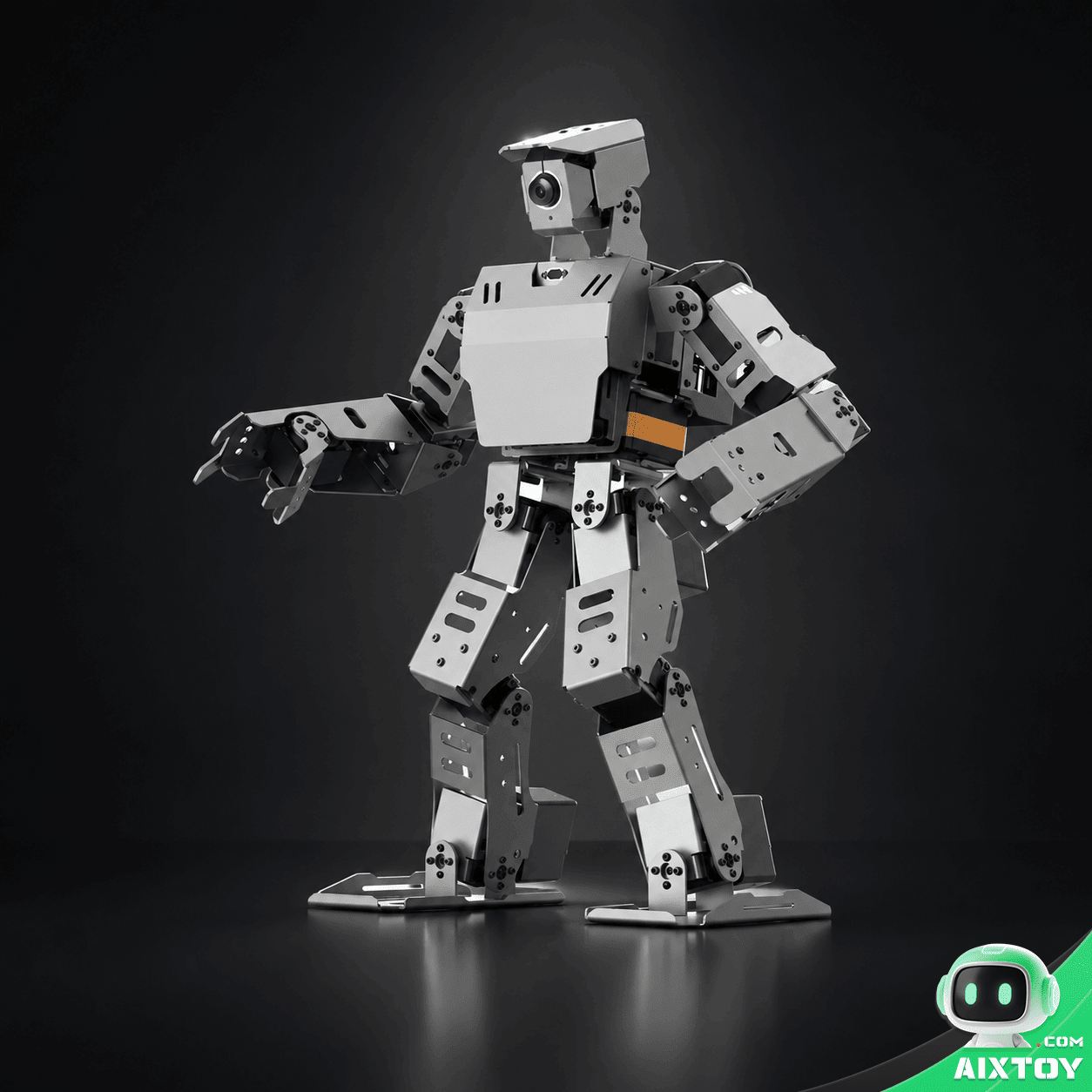
ROSMan Humanoid Vision Robot
$6,900.99
Hiwonder’s flagship 24-DOF ROS humanoid — a 415 mm aluminium biped on a Raspberry Pi 5, with a wide-angle AI camera, TOF sensor, two motorised 4-DOF arms and the full ROS source package. It walks, climbs stairs, hurdles, dribbles a ball and sorts objects. The far end of the same family of robots WonderFlash was built for.
Tags:AIXTOY Hiwonder ESP32 Arduino Programmable Robot DIY Robot Robotics STEM Education AI Hardware Robot News